

GAME DETAIL
Stop Sign VR Tools
種別:ゲーム
発売日:2019年12月17日
日本語対応未確認
620円
Steamレビュー
非常に好評
85.7%
63件
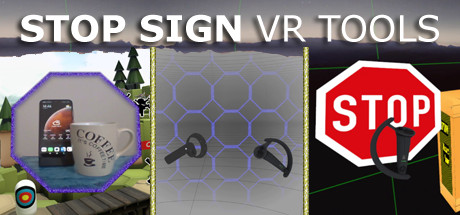
A set of tools that run in VR while you play a game: Cam Circle shows the real world in a circle in front of you. Activate it by double tapping the headset or by pressing both grip buttons. Boundary++ is a warning system showing your walls and ceiling. Boxes warn you for impacts with real objects.
このゲームについて
Steamの詳しい説明を読む
Stop Sign VR Tools has grown into a set of tools that run while you play a SteamVR game. Each tool can be enabled and configured separately. Currently, there are four main tools and a few extras:
Cam Circle uses the headset cameras to show a live view of the real world in a circle in front of you. It has easy shortcuts and activates almost instantly. You can activate Cam Circle by double tapping the headset, or by pressing both grip buttons at the same time. Cam Circle is very useful for quick looks outside the headset and for picking up the controllers after putting on the headset. You can even set it to automatically activate when you put on the headset.
If you use an Index or Vive Pro, Cam Circle can show the pass-through video in 3D. On a Vive it's monoscopic (2D). Cam Circle is not (yet) available for WMR or Oculus headsets.
Boundary++ is a new warning grid system that will show up when you approach your walls and ceiling. It works with native SteamVR headsets, Windows Mixed Reality (WMR) headsets, Oculus PC connected headsets and 'Mixed VR' sets (e.g. a WMR headset with Valve Index controllers). It will automatically import the WMR boundaries or Oculus Guardian (when using a Rift-S).
Boundary++ will not light up the whole play area, but it will only show where you are actually near your boundaries. It can be used together with the default SteamVR chaperone, or just by itself.
Warning Boxes are virtual boxes that you place around your valuable real equipment, such as TVs, ceiling fans, room lighting and so on. They help you avoid hitting real stuff in and around your VR play area.
While you are playing a game a prediction algorithm warns you of possible impacts using sound, images and haptic feedback.
The boxes will fade out when you move away from them. The fade-out and full-visibility distances can be configured for each box separately.
If you can't find your boxes because they're faded out, press the system button and look around.
The HUD is a Heads-Up Display that will show up when you are moving backwards into a wall or other boundary object, such as a Warning Box.
Extras and other info:
A box can be configured to show content by other overlay apps. E.g. a box can show the fpsVR overlay on one of its sides, or it can show the content of a Desktop+ overlay.
Do you use a Mixed VR set and experience grey screens with seated games? This app has a fix for that problem. You can find it on the Boundary++ settings page on the SteamVR dashboard.
All basic settings are accessible on the SteamVR dashboard pages for Stop Sign VR. Next to the basic settings there are many things that can be configured and fine-tuned using the separate Settings Editor program in Windows (not in VR). Also use this Settings Editor to add more virtual boxes, delete or edit them. You can start the Settings Editor from the Windows System Tray, next to the clock in the bottom right corner of your desktop.
The Stop Sign VR Tools runtime is 100% coded in C++ and optimized to spend very little CPU/GPU cycles. It does not harm the performance of other VR software.
The alert sounds are spatialized by Steam Audio's HRTF-based binaural rendering so you will hear where the closest wall or object is, even if you can't see it.
スクリーンショット

評価・レビュー
全体レビュー 非常に好評 好評率 85.71% / 63件 取得:2026年7月21日 17:47
日本語レビュー レビュー不足または未評価 好評率 100.00% / 1件 取得:2026年7月21日 17:47
プレイ時間の目安 約7.9時間 Steamの好評レビュー54件から推定 信頼度:標準
ATTENTION
注目度メトリクス
プレイヤー推移
データ蓄積中 24時間平均選択した期間に観測データはありません。
Steamフォロワー推移
2件以上で集計 直近7日選択した期間に観測データはありません。
プレイヤー数とフォロワー数は意味と単位が異なるため、 別々の時系列として表示しています。補間した値は使用していません。
発売後注目度の基礎指標 発売済みタイトルのため、現在プレイヤー数・ピーク値・Steamフォロワー数を組み合わせて勢いを観測します。
| 指標 | 現在値 | 観測状況 |
|---|---|---|
| 現在プレイヤー数 | 0人 | 最終観測:2026年7月31日 17:14(56日経過) |
| 24時間ピーク | データ蓄積中 | 履歴あり・更新待ち・直近7日 0件 |
| Steamフォロワー数 | 未集計 | 最終観測:未集計 |
| 7日フォロワー増加 | 2件以上で集計 | 未集計・直近7日 0件 |
PlayMEXが保存した観測値です。取得時刻と観測数を あわせて確認できます。
ジャンル・機能
機能カテゴリ
VR限定シングルプレイヤーファミリーシェアリング被追跡コントローラサポート
注目ポイント
更新あり 直近14日以内にSteamストア更新
価格変更 直近14日以内にSteam価格情報の変更
ゲームライフログ
所有ゲームとして同期されると、 このゲームの記録を残せます。