
GAME DETAIL
MANIC MINERS
種別:ゲーム
発売日:2016年8月8日
日本語対応未確認
205円
Steamレビュー
賛否両論
50.0%
14件
Welcome to "MANIC MINERS" - just imagine, "Lemmings" meets "Boulderdash" ... with TNTs, fuse bombs, lasers and flamers tossed-in-too! Deploy your Tiny Miners (TM) to collect, and safely return home, as many jewels as possible. But, be very, very, aware - there's a million ways to die daan there!
このゲームについて
Steamの詳しい説明を読む
----------
Overview
----------
Welcome to "MANIC MINERS" - just imagine, "Lemmings" meets "Boulderdash" ... with TNTs, fuse bombs, lasers and flamers tossed-in-too! And jewels, jewel-bags, coins, ice, bulbs, smoke, smileys, sparks, huge trees, wormholes, gas-pockets, earthquakes and lakes! Now with hint-mode, help-mode, mini-missions, two-player online game, and a map editor! Nigh-Swan !-)
Please be sure to check out the Community Hub - Screenshots and Videos !-) And, please do try the TUTORIAL MAP in the Steam Workshop !-)
And if you encounter any issues on your machine, please do not just leave a negative review, please send a description including which Windows/DirectX, preferably with a screenshot, to here:
manic-miners@outlook.com
"Excavate To Accumulate!"
Deploy your Tiny Miners (TM) to collect, and safely return home, as many jewels as possible. But, be very, very, aware - there's a million ways to die daan there! Well, ok, seven anyway! Yes, the Seven Deadly Things! So, just a tip ... Try to avoid falling. And drowning. And getting squished. Or gassed. Or burnt. Or blowed-up! (The seventh method is suicide!) Oh, and yes, do watch out for them darned wormholes, gas-pockets, and earthquakes! And all that deadly chokey-smokey!
And all with commandments and commentary in the silky-smooth, calming voice of your narrator, "Manic Minnie".
Such is "Manic Whirled"! One hundred thousand landscapes where there's no health nor safety. But it's one hell of a beautiful place to die ?-)
Now with Manic-Miners-Mini-Missions ... you're given just sixty seconds to complete a task, for rewards of random weapons boosts !-)
Fancy tossing your TNT at a Steam friend? Well, now you can, with the two-player online game. Featuring wall-building to help protect your claim to territory, and thus resources! Undermine your opponent's hut's foundations to claim outright victory! So, think of the one-player game as a practise mode to prepare you for a proper battle !-)
And even includes a (simple, but with more functions coming soon-ish) map editor!
Incidentally, here's some more DMA-ness, for Android !-)
-------------
How To Play
-------------
Your Tiny Miners have abilities similar to "Lemmings", eg: bash (left or right), dig (down or up), climb, build, float, etc. When you deploy a Miner, he will dumbly walk forward until you command him to do something. Be aware that, when underground, a Miner will continue any current activity until he is aligned to a map square before starting a new one. You can click on an ability button to select it, then LMB on a Miner to start or stop that ability. Alternatively you can play via keyboard, so press a key to issue a command, and press the same key again to stop bashing or digging, or to disable climbing. All keyboard controls can be redefined via title screen.
Thus, you would typically dig down to where the goodies are, whilst avoiding explosives, falling objects (eg: ice and rocks will fall if not supported, and boulders also roll sideways if the earth beneath them is not intact, similar to "Boulderdash"), etc. Wormholes and gas-pockets cannot be seen until you open them, by passing into their map squares.
When underground, your Tiny Miners will dig and bash so as to remain aligned to map squares, so if you press a key, wait for the response, do not press again because your Miner does not start instantly, as this will cancel the command. This is so you only dig/ bash into a single square at a time (you would not want to simultaneously enter two squares where, for example, one might be a jewel and the other an explosive). Again, if you command to stop digging down, or change to bashing, your Tiny Miner will finish emptying his current square, so the bashing will be safely aligned to a single object.
When your Miner has proved his worth at collecting, then you must return him home to receive payment for the jewels he has. Thus digging up and building are possible. The trick is to not be too greedy, because if your Miner dies on the way home, he will then attempt to drop a jewel bag. When playing a loaded map, this will contain all the jewels carried by the dead Miner. Alternatively, when playing a generated landscape, it will only contain half of his carried jewels.
---------------------
On The Title Screen
---------------------
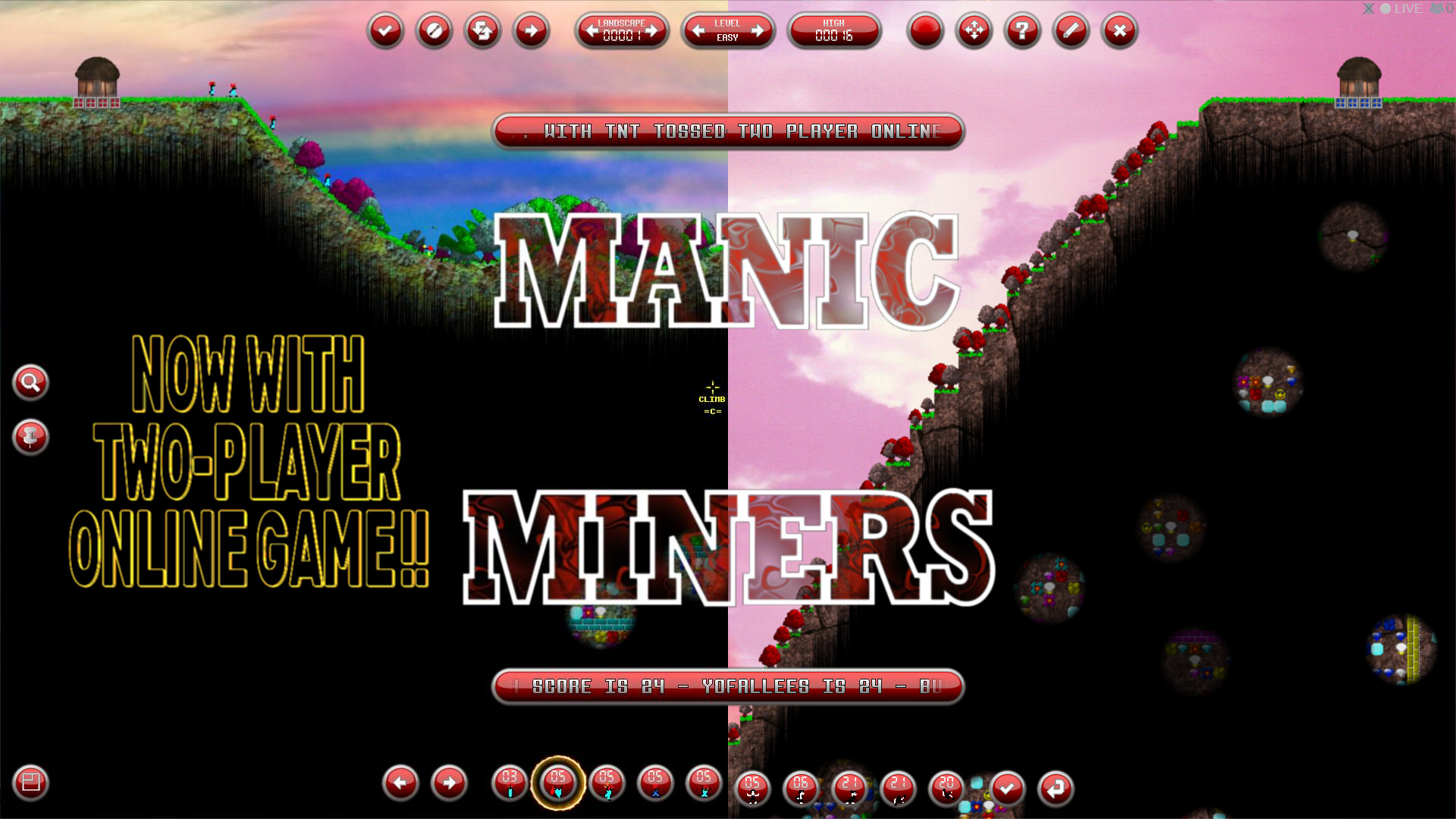
Across the top of the title screen, which itself alternates between a Manic-Auto-Demo, or a previously-played Game-Replay, you will find, from left to right, the following bars and buttons:
The top-left five buttons are: one-game; two-player; load saved game or level map; reset MAD/GR; and deposit the current MAD/GR map number into the landscape bar.
In the middle, are three bars: the landscape selector (1-99999); the level selector (Easy/Medium/Hard); and the currently-selected landscape's high-score. This is the number of jewels safely and successfully returned home. The landscape selector's arrows can be pressed with the LMB for slow, the RMB for fast. Or press both for faster, where the order of pressing them also counts. Or just L/RMB on individual digits for minus/plus one.
The top-right five buttons are: customise RGB; define keys; show stats; editor; and quit! You can pimp your Tiny Miners, by changing the colours of their parasol, hair, eyes, skin, boiler-suit, gloves, bag, and boots. First LMB on the item button, then on the preferred colour button. In the same way, the define keys page allows all of the keyboard preferences to be chosen. First LMB on the relevant bar, then press the required key. The stats page lists all of your current Steam achievements, and will hopefully become more periodic-table-like as more are added.
The bottom-left button (also visible during the game), is press with LMB for slow, or RMB for fast, and move the mouse to scroll the map window. Also, CTRL can be pressed to enable window scrolling. The Landscape Editor can also be accessed by pressing TAB.
--------------------------
Two-Player Online Game
--------------------------
The second button on the title screen opens the "Invite Friend" page. It lists your Stream friends, and you can select any to invite into a two-player online game. If you receive an invite, the button on the title screen will flash, and then the page will show from whom, and you can accept the invite. The two-player game will begin upon acceptance of an invite, and, yes, two-player games can be saved, and loaded, obviously, later!
On the invite page, you will also see the landscape and difficulty bars. Whomever sends the invite will define these, and will play the game as Player One (hut at the left of the map). Player Two (in the right hut) will thus be whomever accepts the invite to the sent landscape and difficulty.
When you choose to load a saved two-player game, an invite will be sent to the relevant Steam friend, and the game will commence for both players when the invite is accepted.
Don't forget, featuring wall-building to help protect your claim to territory, and thus resources! Undermine your opponent's hut's foundations to claim outright victory! Go on, try it now: bash away the four squares directly beneath your hut's metal foundations !-)
-------------------------
The Landscape Number
-------------------------
This is used as the seed for a list of pseudo-random numbers, in order to create procedurally-generated:
+ landscape shape;
+ rainbow sizes (inner and outer radii) and intensity (if a daytime sky texture);
+ sky texture (1 of 30), speed (slow/fast) and direction (left/right);
+ grass colouring (RGB);
+ earth texture (1 of 30) and colouring (RGB);
+ water height, colouring (RGB), speed (slow/fast) and direction (left/right);
+ dinosaur skeleton texture (1 of 5), position, size, and direction (left/right);
+ locations and sizes of trees (max size is determined by landscape slope, else always Bonsais for stepped, and colours according to grass, soil and water RGBs);
+ locations of objects.
The landscape shape is either flat, or determined by a random number of randomly-sized/positioned curves, and also with a one in five chance that the curves will then become steps. It is then 50/50 whether the objects will be placed singularly, or in horizontal/vertical lines.
--------------------
The Difficulty Level
--------------------
This is used to determine the numbers of objects in the generated landscape. This generally means that Easy results in more of the nice objects (eg: jewels), and less of the nasty objects (eg: explosives). Obviously, Hard is the proverbial vice-versa.
-----------------
During Le Game
-----------------
The top-left button is used to select weapon mode, from the available weapons which are carried by your currently selected Tiny Miner. For the current weapon type, the button shows your currently selected Miner's available weapon count, if you have one.
TNT: It's never been so much fun to toss ... TNT! You must always toss your TNT upwards! Thus, the mouse has to be above your Miner's height to toss one. Also, you can press CTRL to focus the view upon your TNT's impact point (if Enlarge-O-Scope is off).
FUSE BOMB: When in fuse bomb mode, you will be shown a fading fuse bomb at the location your currently selected Tiny Miner will ... drop one! A nice, smooth, hard, shiny, black round one! Simply press LMB in the map to leave behind a fuse bomb, and get out of the way before its fuse runs out!
LASER: When in laser mode, you will be shown a fading laser spot at the location your currently selected Tiny Miner will fire one from. Simply aim with the mouse, and press LMB to fire!
FLAMER: Again, when enabled, you will be show a fading flamer at the side your currently selected Tiny Miner will fire one from (left/right/above/below). Aim with the mouse, horizontally or vertically, and LMB to fire!
The next button is used to enter Wall Mode. During this, any of your Miners can build with brick or metal wall into nearby empty map squares, as long as the square can adequately support it. A brick can be placed on top of firm soil, or any other solid object, thus creating a vertical wall, whilst metal can also be placed beneath and next to another same-coloured metal, thus forming horizontal structures. So, point at a square, and if you can build there, the mouse will show as normal, or it will be transparent if the square cannot be built.
To the right of these are three bars, the middle of which shows your current available funds, and the elapsed game time. The first bar, when you have a selected Miner, shows how many jewels that Miner is carrying, and the states of his climb, float, and breathe abilities. Beneath these are the Miner's number, his current movement direction (left or right), and his current activity mode. When you have no Miner selected, this bar shows how many Miners you have deployed in the landscape.
The third bar shows two jewels counts, and your total number of deaths during the current game. When playing a generated landscape, the jewels counts are your jewels (see next), and the total number of jewels in the landscape. If you have a selected Miner, then it shows how many jewels carried by him. If you have no selected Miner, then it shows the number of jewels carried by your deployed Miners. If you have no deployed Miners, then it shows the number of jewels returned home. For a loaded level map, the jewels counts are your number of jewels returned home and required number of jewels to complete the level. The two top-right buttons are save game, and quit game, and they function as soon as pressed, so do so only if you mean it!
At the bottom centre of the screen (when the Enlarge-O-Scope not active) are the game-play buttons (equivalents to keyboard controls). The two bottom-left buttons select through your deployed Miners. To the right of these are the ability icons, and the two bottom-right buttons will start/stop the selected ability, and change the selected Miner's direction (turn).
スクリーンショット
評価・レビュー
全体レビュー 賛否両論 好評率 50.00% / 14件 取得:2026年9月1日 10:44
ATTENTION
注目度メトリクス
プレイヤー推移
データ蓄積中 24時間平均選択した期間に観測データはありません。
Steamフォロワー推移
2件以上で集計 直近7日選択した期間に観測データはありません。
プレイヤー数とフォロワー数は意味と単位が異なるため、 別々の時系列として表示しています。補間した値は使用していません。
発売後注目度の基礎指標 発売済みタイトルのため、現在プレイヤー数・ピーク値・Steamフォロワー数を組み合わせて勢いを観測します。
| 指標 | 現在値 | 観測状況 |
|---|---|---|
| 現在プレイヤー数 | 0人 | 最終観測:2026年7月26日 04:18(64日経過) |
| 24時間ピーク | データ蓄積中 | 履歴あり・更新待ち・直近7日 0件 |
| Steamフォロワー数 | 136人 | 最終観測:2026年9月15日 20:04(12日経過) |
| 7日フォロワー増加 | 2件以上で集計 | 履歴あり・更新待ち・直近7日 0件 |
PlayMEXが保存した観測値です。取得時刻と観測数を あわせて確認できます。
ジャンル・機能
機能カテゴリ
PvPSteamクラウドSteamランキングSteamワークショップSteam実績オンラインPvPシングルプレイヤーデータファミリーシェアリングマルチプレイヤーレベル編集可能解説モード使用可能
ゲームライフログ
所有ゲームとして同期されると、 このゲームの記録を残せます。