
GAME DETAIL
Book of Demons - Dungeons & Streamers
種別:DLC
発売日:2018年11月28日
日本語対応未確認
無料
Steamレビュー
やや好評
70.0%
10件
Dungeons & Streamers is a free DLC that adds Twitch and Mixer integration to Book of Demons. You play the game and your audience goes crazy typing commands in the chat. They spawn monsters and traps, but they can also aid you in your quest. Will they help you or harm you?
このゲームについて
Steamの詳しい説明を読む
Dungeons & Streamers is a free DLC that adds Twitch and Mixer integration to Book of Demons. You play the game and your audience goes crazy typing commands in the chat. They spawn monsters and traps, but they can also aid you in your quest. Will they help you or harm you? Try your luck and see if you can outsmart them in the paper dungeons!Features
Allow your Twitch or Mixer audience to interact with your game
Enable or disable select features
Control audience influence strength
Limit the interactions to paid subscribers (Twitch)Types of Interactions
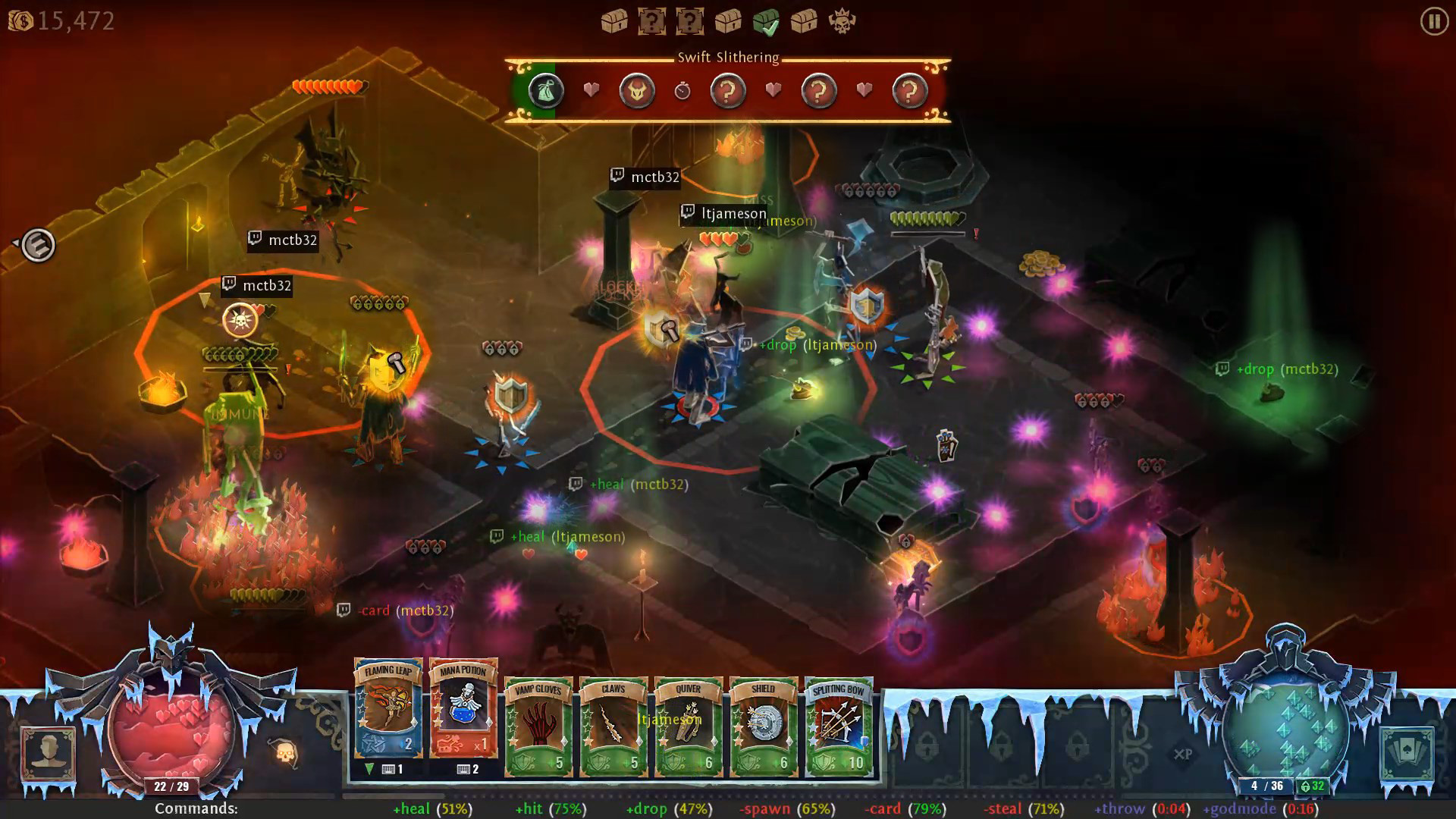
When in game, the bar at the bottom of the screen always shows the commands available to your audience. In the dungeon, there are always 6 basic interactions (3 positive and 3 negative), followed by two special interactions. Your audience activates the functions by typing the commands in the chat window, for example +heal.Basic Interactions
Each basic interaction is associated with an activation chance percentage, shown after the name in parenthesis. This is the chance that a viewer’s command will actually work. It falls when too many people trigger the corresponding action and it rises when it sits idle. If too many people trigger the action and it drops to 0% chance, it will go on a cooldown.
Positive:
+heal – drops health or mana globes near player
+hit – deal damage to random monster near player
+drop – spawn a random drop near player (gold, card charge, etc.)
Negative:
-spawn – spawn a random monster near player
-card – apply a negative effect to player’s card (knock, web, etc.)
-steal – destroy one of the visible drops at randomSpecial Interactions
The special interactions are more powerful and they behave a bit differently. They start on cooldown and once available they can be triggered only once, or they are active for a specified amount of time. After this, they are replaced with another random special action.
Positive:
+prize – drop a random prize for the player
+throw – when active, viewers can type +throw to throw random monsters away from player
+godmode – give the player a short divine shield
+stun – when active, viewers can type +stun to stun monsters
+deathrage – trigger player’s deathrage effect
+freeze – when active, viewers can type +freeze to freeze random monsters
Negative:
-stun – stun the player
-poison – poison player
-boss – spawn a random boss near player
-freeze – freeze player
-burn – spawn fire under player
-icetrap – surround player with icicles
-mouse – when active, viewers can type -mouse to knock players mouse cursor
-throw – when active, viewers can type -throw to throw random monsters towards playerLegendary Card Voting
When you find a magic card, you will need to bring it to the Sage for identification. When this is a Legendary card (the most rare type of cards) you will be presented with two different cards for your audience to choose. During the vote, your viewers must type +vote1 or +vote2. Everyone is entitled to one vote. If there is a tie, the card is selected at random.
In the options, you can disable this feature or set the length of the vote (default 30 sec).How to connect
Before you can start playing with your audience, you need to connect Book of Demons to your Twitch or Mixer account. After you install the DLC, a new button appears in the lower right corner of the character selection screen. It opens the Dungeons & Streamers connection and configuration window.
Set up your connection with either Twitch or Mixer on the left side, by entering the name of your channel and requesting an OAuth token (Twitch) or by logging into Mixer in the external browser. For Twitch mode you can also limit the interactions to your paid channel subscribers.
On the right side, you can tweak the integration options. Hover on the checkbox labels for an explanation of each feature.Viewer Influence Option
The Viewer Influence slider allows you to adjust the extent to which your audience can affect your game. Making it lower will make your game more balanced, but your audience will have fewer opportunities to spawn threats or aids. If you set it to High you will be totally at the mercy of your viewers and their actions will decide the difficulty level of the game.
Note: viewer influence also automatically scales with the number of viewers active in the channel, so having more active viewers should NOT make the game any less balanced.
スクリーンショット
評価・レビュー
全体レビュー やや好評 好評率 70.00% / 10件 取得:2026年9月21日 21:34
ATTENTION
注目度メトリクス
プレイヤー推移
データ蓄積中 24時間平均選択した期間に観測データはありません。
Steamフォロワー推移
2件以上で集計 直近7日選択した期間に観測データはありません。
プレイヤー数とフォロワー数は意味と単位が異なるため、 別々の時系列として表示しています。補間した値は使用していません。
発売後注目度の基礎指標 発売済みタイトルのため、現在プレイヤー数・ピーク値・Steamフォロワー数を組み合わせて勢いを観測します。
| 指標 | 現在値 | 観測状況 |
|---|---|---|
| 現在プレイヤー数 | 未集計 | 最終観測:未集計 |
| 24時間ピーク | データ蓄積中 | 未集計・直近7日 0件 |
| Steamフォロワー数 | 未集計 | 最終観測:未集計 |
| 7日フォロワー増加 | 2件以上で集計 | 未集計・直近7日 0件 |
PlayMEXが保存した観測値です。取得時刻と観測数を あわせて確認できます。
ジャンル・機能
機能カテゴリ
SteamクラウドSteamトレーディングカードSteamランキングSteam実績キャプション使用可能シングルプレイヤーダウンロードコンテンツデータファミリーシェアリング部分的コントローラサポート
ゲームライフログ
所有ゲームとして同期されると、 このゲームの記録を残せます。